 by: Wulfy
 Categories:
Tutorial: Use and Management of MSX Discs
This tutorial is intended to answer your questions about the use and management of MSX diskettes. We advise you to read this guide carefully and follow the steps in real time to become an expert in MSX diskettes.
If you have a recent computer, you can use DISKMGRa programme written by Rudolf Lechleitner. This freeware is able to format a compatible MSX diskette and transfer a file .DSK to make it readable on any MSX microcomputer.
1. Formatting a MSX Compatible Diskette
Equipment Required
- A diskette 1.44 MB (double face, high density)
- Adhesive tape
- A PC with a disk drive
Steps to follow
- Preparation of the Diskette :
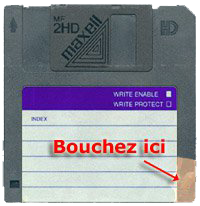
- Take a 1.44 MB floppy disk and close the protection hole at the bottom right with tape. This allows it to be converted into 720 KB diskette.
- Formatting the Diskette :
- Insert the diskette into your PC drive.
- Open the command prompt (cmd).
- Type the following command to format the diskette in 720 Kb :
format a: /T:80 /N:9
- If you want to format in 360 KB, use the following command:
format a: /T:40 /N:9
Note : Since Windows XP, formatting in 360 KB is not supported. You will need a compatible operating system or emulator.
2. Copy DSK File to MSX Disk
Equipment Required
- A file .DSK (disk image)
- The programme DCOPY 16-bit executable
Steps to follow
- Formatting the Diskette :
- Follow the steps above to format a diskette in 360 KB or 720 Kb according to your needs.
- Downloading DCOPY :
- Download the program DCOPY. Note that this is an executable 16 bits, so it won't work on systems 32 and 64 bits modern. You can use an emulator like DOSBox to execute it.
- Placement of DCOPY :
- Place
Dcopy.exein the same directory as your files .DSK to simplify access.
- Place
- Transfer from DSK File :
- Open the command prompt (cmd) and navigate to the directory containing
Dcopy.exeand your file .DSK. - Type the following command to transfer the DSK file to the diskette:
- Open the command prompt (cmd) and navigate to the directory containing
Dcopy <nom_du_fichier>.DSK 0 0 0
-
- Replace <nom_du_fichier> by your DSK file name. The three zeros correspond respectively to the parameters of tracks, sectors and heads (use 0 for default values).
- Verification :
- After a few moments, you should see a message that the transfer is complete. Your diskette is now ready for use on your MSX.
3. Create a DSK Image of a MSX Diskette
Equipment Required
- An original MSX diskette
- A PC with a disk drive
Steps to follow
- Insertion of the Diskette :
- Place your MSX diskette in your PC drive.
- Creating the DSK Image :
- Open the command prompt (cmd).
- Type the following command to create a DSK image:
diskcopy a: <nom_du_fichier>.DSK
-
- Replace <nom_du_fichier>by the name you want to give to disk image.
- Verification :
- Once the process is complete, you should have a file .DSK in the current directory, ready to be used with emulators.
Final remarks
- Be sure to follow every step carefully to avoid errors.
- If you encounter problems, check the connections of your hardware and make sure the software is properly installed.